

If you want your products to reach customers on Google in no time, you’ve come to the right place. Today, we’ll uncover the secrets of using an XML file in Google Shopping. Don’t worry — this won’t be another difficult read in the style of an “Advanced Coding Handbook.” Instead, we’ll dive into a beginner-friendly guide that will walk you through the process step by step.
The general purpose of XML files in the context of Google Shopping is to provide complete, up-to-date, and consistent data about your products. The display of the XML file determines whether your products will appear on the first page of search results or get lost somewhere in the depths of the internet. So if you want your products to attract customers’ attention and make competing companies tremble at the knees, it is worth understanding how this magical XML file works. But don’t worry — we won’t go into overly technical details. We will simply explain why this file is so important for your success in Google Shopping.
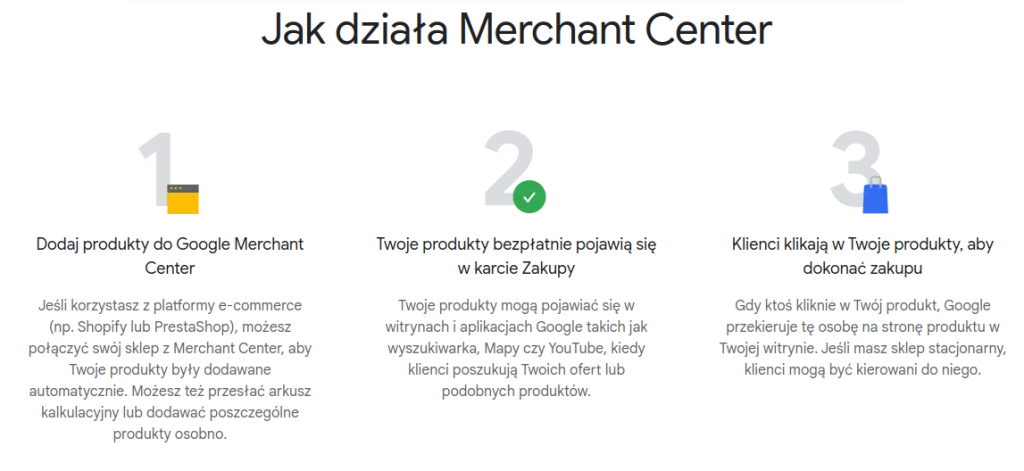
Creating a file and understanding the general use of XML files for Google Shopping may seem like a complicated task, but don’t worry! It only takes a few simple steps for you to set sail with full speed on the waves of e-commerce. Below, you will find a step-by-step guide to help you overcome the challenges of working with XML files.

Done! Now your XML file is ready to work toward promoting your products in Google Shopping.
Sign up for webeAds and get access to exclusive tools to increase sales!
Click here and discover more!
TRY IT FOR FREE!
If you want your products to instantly attract customers’ attention on Google Shopping, you need to make sure that your product data is as comprehensive and optimized as possible. Below you will find tips on the key information that should be included to maximize the visibility of your products.
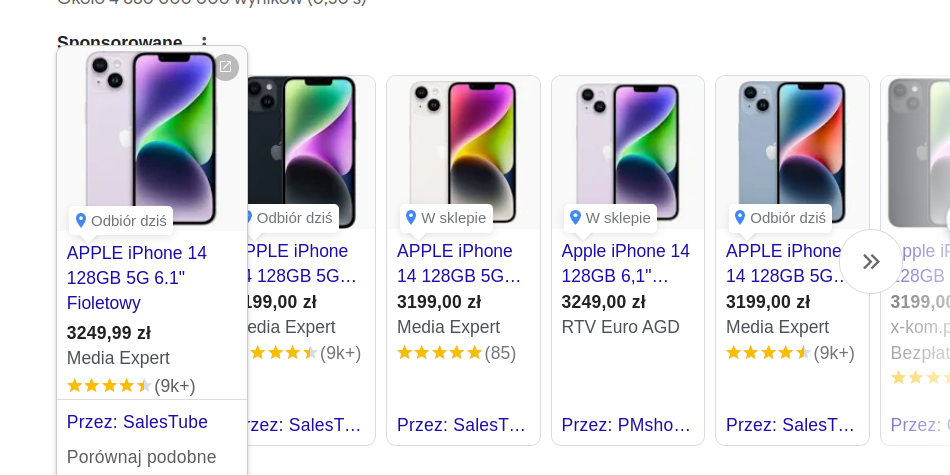
The product name is the first thing potential customers will see in Google Shopping search results. Make sure the name is short, while still describing the product clearly and attractively. The title should be grammatically correct and fit within 150 characters, without unnecessary spaces. Avoid unnecessary information such as “free shipping” or “ships within 24 hours.”
Clearly specify the price of each product in the XML code. The price should be up to date and consistent with the price shown on your website to avoid confusing customers.
Information about stock availability is crucial to avoid displaying unavailable products or showing out-of-stock information in search results. Make sure that stock availability is updated regularly.

Each product should have a unique identifier that clearly distinguishes it. This can be an SKU (Stock Keeping Unit) number or another identifier used on your e-commerce platform.
Providing the product brand allows customers to recognize and identify the product more quickly. Make sure the brand is defined correctly and matches the product brand shown on your website.
A carefully prepared and properly worded product description can significantly increase the appeal of your offers in Google Shopping. The description should be concise, but it should include the product’s key features and encourage customers to click.
Although they are not directly included in the file schema, it is worth making sure that each product is illustrated with a high-quality image. The images should be clear, sharp, and ideally present the product in the context of its use.
Assigning appropriate product categories makes it easier for customers to find the products they are interested in. Make sure each product is assigned to the correct category.

Make sure that all this information is included in the file in a consistent way and in line with Google Shopping requirements. A properly structured file will help achieve maximum product visibility and effectively attract the attention of potential customers.
Before generating files for Google Merchant Center, it is worth carrying out thorough testing to make sure that all the data used for processing the XML file is correctly formatted and that the products are displayed as expected.
The first step is to ensure that the XML structure is properly formatted and free of syntax errors. You can use various online tools for syntax validation that will automatically check whether your XML file is compliant with formatting requirements.
Before importing the XML file into Google Merchant Center, it is worth carrying out local tests. Set up a test environment on your server or computer and import the file. Check whether the products are displayed correctly, whether the data is properly assigned to the appropriate fields, and whether there are any display errors.
To assess more accurately how your products will appear in Google Shopping search results, use emulation tools that allow you to simulate the display of search results based on your file. Check whether the products are displayed correctly and whether their attributes match expectations.
Monitor logs, XML elements, and reports related to the processing of the XML file in Google Merchant Center. This way, you will be able to track whether the XML files have been processed successfully and whether any errors or warnings appeared during import.
If you encounter any challenges during testing related to the complex structure of an XML document, move on to resolving them. Check the XML file to make sure all required fields are filled in, the XML language is properly formatted, and the product identifiers are unique.
After resolving the issues related to the file, make the necessary corrections and test the file again to ensure that everything works properly. Try to maintain a regular cycle of updating and testing the XML document to ensure its ongoing accuracy and compliance with Google Shopping requirements.
Here are some useful tools that can help you work with large XML files.

And finally! Now that you have all these great strategies and tools at your fingertips, there’s no better time than now to get to work and increase the visibility of your products in Google Shopping! Just imagine your products appearing instantly in search results and catching the attention of hundreds of potential customers. It’s not magic — it’s the result of well-optimized XML files and informed actions within a structure that may seem complicated at first glance. Thanks to the right product data, a clear file structure, and regular updates, your products can achieve high positions in Google Shopping search results. So why wait?
All you need to do is implement the strategies described, using the available tools and resources, to begin your journey to success in Google Shopping. Let your products shine like diamonds in Google’s virtual storefront, attracting attention and generating profit. Give them a chance to stand out and watch your business grow stronger!
Check out other articles: